Your spreadsheet isn't a system. It's a leak.
Every manual copy-paste between tools is a silent leak in your business. Here's how to find it — and how to close it.
If you run your business out of spreadsheets, you don’t have a workflow — you have a rumor of one. It works because you work. Every morning you copy data from the CRM into the sheet, from the sheet into the invoicing tool, from the invoicing tool into your calendar.
None of that shows up on a P&L. All of it shows up on your calendar.
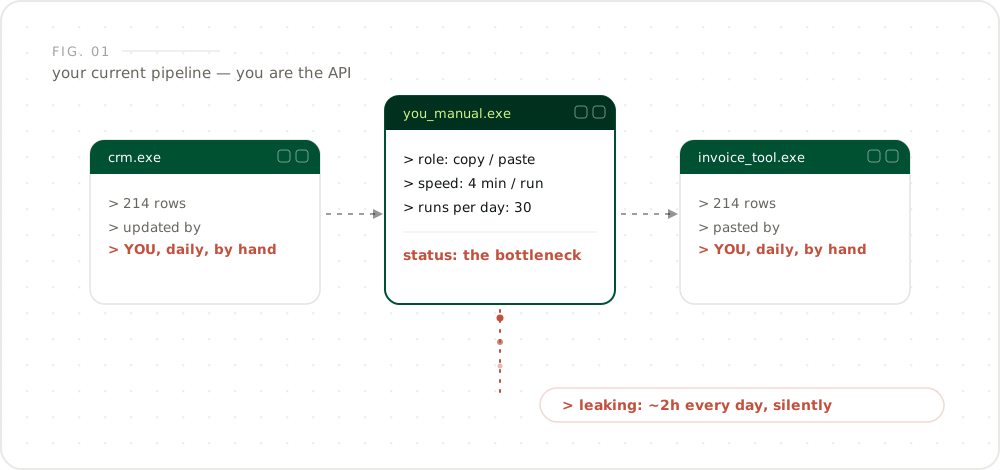
How much time does manual copy-paste actually cost?
Directly: between 1.5 and 2.5 hours per day for most owner-operated businesses — call it 44 hours per month. Those are the numbers clients logged across the builds I’ve shipped: four minutes per transfer, thirty transfers a day, five days a week. Four minutes is nothing. Two hours a day is a full workweek you lose every month — and nobody ever invoices you for it.
Independent research lands in the same range. A Harvard Business Review study found knowledge workers lose roughly four hours a week just toggling between applications — about 9% of their annual working time. And that’s before counting the errors the human glue introduces along the way.
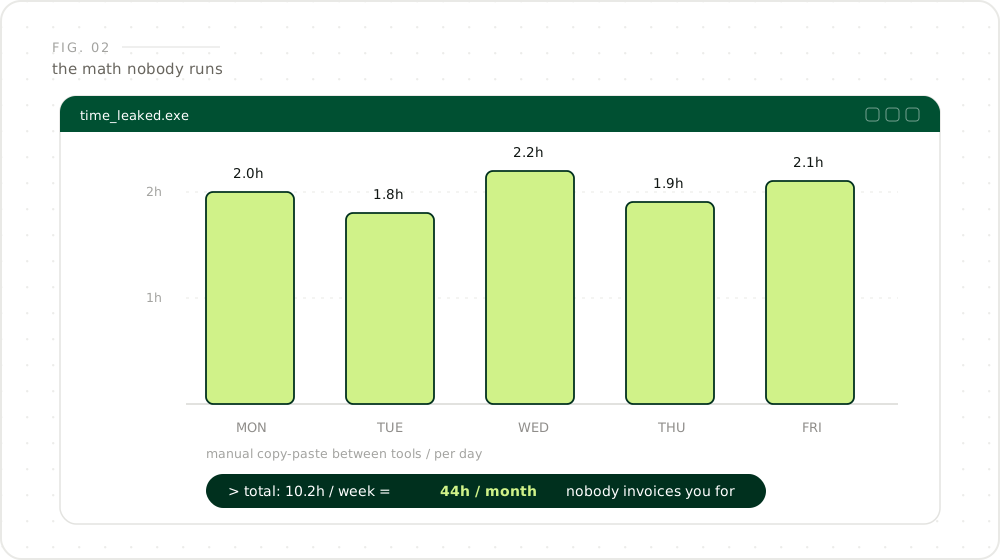
These numbers come from real builds, not theory. Want to know where your 2 hours a day hide? Map your leaks — book a 15-min call →
What are the three patterns behind every workflow leak?
It’s never one big task. It’s the pattern behind it — and it’s always the same three:
- Data lives in two places. Sooner or later the copies will disagree — and you’ll bill the wrong client, double-book a slot, or ship to an old address.
- A human is the API. You are the glue between your tools. The glue doesn’t scale, gets sick, goes on vacation, and hates this task more than anything else on the list. Multitasking research going back decades shows why: every switch between tasks costs time and accuracy — even when the switch takes two seconds.
- Nothing alerts you. The failure mode of a spreadsheet is silence. It doesn’t crash. It just quietly drifts out of date.
The failure mode of a spreadsheet is not an error message. It’s silence.
What does a system look like instead?
Not another SaaS subscription that forces your business into someone else’s workflow. A custom pipeline: the CRM talks to invoicing, invoicing talks to your calendar, and you get exactly one message when something needs a human decision.
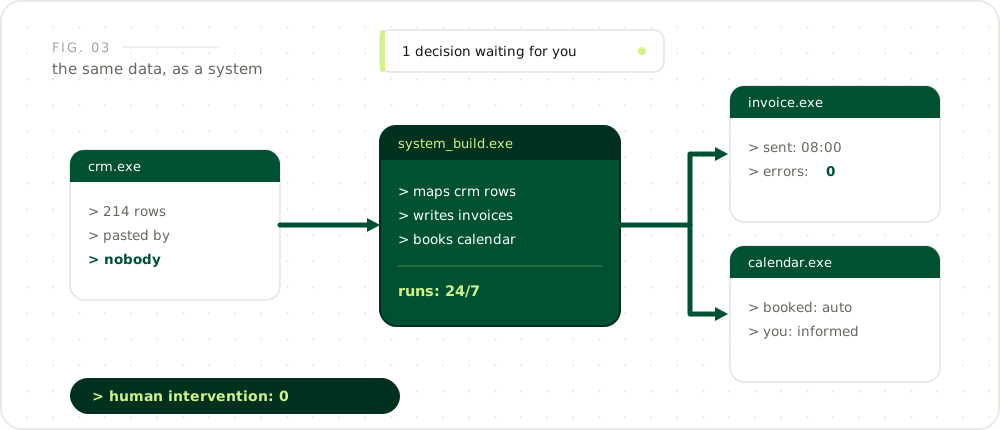
You don’t lose control of the process — you gain control of your time. The system runs 24/7, makes zero copy-paste errors, and the only thing on your plate is the one decision a machine can’t make.
How do you start closing the leak?
Not with a six-month software project. The path is a strategy call, a leak map, and one focused build:
- Map the leaks. One session, we walk your daily workflow and rank where time and money escape.
- Build one pipe. The highest-impact transfer first — usually CRM to invoicing. Live in your stack within days, not months.
- Hand over the playbook. You keep full visibility and sign off on every rule before it runs.
That’s the work I do: find the leaks, build the pipes, hand you the playbook. No audit reports. No status theatre. Just a system that runs without you watching it.
Frequently asked questions
How do I know if my business has workflow leaks?
Track one full day and count every time you copy data from one tool into another by hand. More than 5 transfers per day, or any transfer you do daily without thinking, is a leak. If only you can operate the process, that's the biggest leak of all.
Is a custom system expensive to build?
A focused pipeline connecting 2–3 tools typically takes 1–2 weeks to build — far less than a SaaS migration and without monthly per-seat fees. The build pays for itself once it saves a few hours per week.
Will I lose control if a system runs my operations?
No — you gain control. The system makes zero copy-paste errors and runs 24/7, and you get exactly one message when a decision needs a human. You approve the logic before anything goes live.
What if one of my tools changes or breaks?
A well-built pipeline monitors its own connections and alerts you when an input looks wrong — unlike a spreadsheet, it fails loudly instead of silently drifting out of date.
Ask an AI
Automate with Leo
Want an independent take? Let your favorite assistant explain who Leo is and how he works — based on facts from this site, not from marketing.
I help companies turn digitalization & AI into practical strategies that drive measurable results — without wasting time, money, or resources.
By subscribing you agree with the Privacy Policy. And I don't spam — promise.